Okay so I've been lazy and really neglected this project.
Excuses (not in any particular order):
1. Three year daughter find it boring when I code
2. Proper work has been busy
3. I built this bike: Shiny! Bike!
4. I broke my wrist.
But now I have a shiny rebuilt PC (excuse no.5) running Windows 7, and I have my VS2010 beta. So it is time to update Lizard so I can use it.
I've just been reading this:
http://msdn.microsoft.com/en-us/magazine/ee819091.aspx
and this:
http://blogs.msdn.com/clrteam/archive/2009/06/03/in-process-side-by-side-part1.aspx
It seems that now I can write all my shell extentions in managed .Net code, my diversions into the land of c++ are no longer required. Hoorah!
Now I must find my old code, dust it off, fix it, and find out what I can use now the windows explorer API IColumnProvider has been deprecated.
I've pretty much completed the manual three way diff/conflict resolver too.
Hope this isn't too late for everybody,
Ian.
Sunday, 7 February 2010


Wednesday, 3 June 2009
SelectedIndexChanged and again! and again! and again!
If you have a ListView, and it has MultiSelect enabled and you select a row, then scroll down, say, 100 rows, and shift-click, how many SelectedIndexChanged events do you expect? How many do you get? 100, of course, one for every row that had a selection change. You get no special EventArg to let you know this is one of a set, or how many you might expect. As far as the eventing is concerned each highlighted row is wonderous occasion in its own right.
I've got a ListView that shows TFS changesets, when I click on one (in the middle in this example) another list populates that shows all the files in that changeset (nifty, eh?). When I shift-click on another row way down the list, I want to see all the files in that set of changesets. Using my trusted SelectedIndexChanged to let me know the selection has changed, I get oodles of lovely events and can refresh my list of files. If I shift-click right up near the top of the list I get an event for each of the rows being de-selected on one for each of the new rows being selected.
This is not what I want. Now I know that I can use each event to add/remove files from my other list, but because I'm merging data where the same file is in two changesets (to get a combined list of change types), this gets complicated. All I want is one event to tell me that SomeSelectionIndicesChanged. Then I can clear the file list, and re-populate it.
Here is some code to do just that. I don't like the gratuitous use of threads like this, but in WinForm apps, you rarely have more than one instance of the app, and users don't normally do complex multi-row selections on several ListViews at once, so there is little danger of weird concurrency issues. All it does is every time a SelectedIndexChanged is raised, it waits 1/10th second and then raises a new AfterMultiSelect event, if another SelectedIndexChanged occurs in that time, it stops and starts waiting again. If a SelectedIndexChanged occurs after the 1/10 second, but before the AfterMultiSelect has finished being handled, that doesn't matter because it's being handled back on the controls own thread.
Anyway, the code:
using System;
using System.Windows.Forms;
using System.Threading;
namespace Project.ControlManagers
{
public class ListManager
{
private ListView listView;
private delegate void SelectionChange();
public event EventHandler AfterMultiSelection;
public ListController(ListView listView)
{
this.listView = listView;
// listen for all the change events
listView.SelectedIndexChanged += new EventHandler(listView_SelectedIndexChanged);
}
Thread t = null;
void listView_SelectedIndexChanged(object sender, EventArgs e)
{
ThreadStart ts = new ThreadStart(QueueSelectionChange);
// if we already had a thread, kill it
if (t != null)
t.Abort();
// start a new thread to process the event
t = new Thread(ts);
t.Start();
}
void QueueSelectionChange()
{
// have a nap. in this time if another SelectedIndexChanged event is fired this thread will
// be aborted and nothing more will happen.
Thread.Sleep(100);
// invoke the call to raise the new event on the ListViews thread, not this one
// otherwise things will go awry
SelectionChange sc = ProcessSelectionChange;
listView.Invoke(sc);
t = null;
}
void ProcessSelectionChange()
{
// if anyone is listening raise the AfterMultiSelection event
if (AfterMultiSelection != null)
AfterMultiSelection(listView, new EventArgs());
}
}
}
I wouldn't be at all surprised if someone didn't have a good reason not to do this. The same technique can be used to do something after a user has stopped scrolling or resizing something if the work you want to do post scroll/resize is rather expensive and looks crappy if it happens on every scroll/resize event.
Footnote: This is too slow for hundreds of rows, but seems fine for a couple of dozen or so.
I've got a ListView that shows TFS changesets, when I click on one (in the middle in this example) another list populates that shows all the files in that changeset (nifty, eh?). When I shift-click on another row way down the list, I want to see all the files in that set of changesets. Using my trusted SelectedIndexChanged to let me know the selection has changed, I get oodles of lovely events and can refresh my list of files. If I shift-click right up near the top of the list I get an event for each of the rows being de-selected on one for each of the new rows being selected.
This is not what I want. Now I know that I can use each event to add/remove files from my other list, but because I'm merging data where the same file is in two changesets (to get a combined list of change types), this gets complicated. All I want is one event to tell me that SomeSelectionIndicesChanged. Then I can clear the file list, and re-populate it.
Here is some code to do just that. I don't like the gratuitous use of threads like this, but in WinForm apps, you rarely have more than one instance of the app, and users don't normally do complex multi-row selections on several ListViews at once, so there is little danger of weird concurrency issues. All it does is every time a SelectedIndexChanged is raised, it waits 1/10th second and then raises a new AfterMultiSelect event, if another SelectedIndexChanged occurs in that time, it stops and starts waiting again. If a SelectedIndexChanged occurs after the 1/10 second, but before the AfterMultiSelect has finished being handled, that doesn't matter because it's being handled back on the controls own thread.
Anyway, the code:
using System;
using System.Windows.Forms;
using System.Threading;
namespace Project.ControlManagers
{
public class ListManager
{
private ListView listView;
private delegate void SelectionChange();
public event EventHandler AfterMultiSelection;
public ListController(ListView listView)
{
this.listView = listView;
// listen for all the change events
listView.SelectedIndexChanged += new EventHandler(listView_SelectedIndexChanged);
}
Thread t = null;
void listView_SelectedIndexChanged(object sender, EventArgs e)
{
ThreadStart ts = new ThreadStart(QueueSelectionChange);
// if we already had a thread, kill it
if (t != null)
t.Abort();
// start a new thread to process the event
t = new Thread(ts);
t.Start();
}
void QueueSelectionChange()
{
// have a nap. in this time if another SelectedIndexChanged event is fired this thread will
// be aborted and nothing more will happen.
Thread.Sleep(100);
// invoke the call to raise the new event on the ListViews thread, not this one
// otherwise things will go awry
SelectionChange sc = ProcessSelectionChange;
listView.Invoke(sc);
t = null;
}
void ProcessSelectionChange()
{
// if anyone is listening raise the AfterMultiSelection event
if (AfterMultiSelection != null)
AfterMultiSelection(listView, new EventArgs());
}
}
}
I wouldn't be at all surprised if someone didn't have a good reason not to do this. The same technique can be used to do something after a user has stopped scrolling or resizing something if the work you want to do post scroll/resize is rather expensive and looks crappy if it happens on every scroll/resize event.
Footnote: This is too slow for hundreds of rows, but seems fine for a couple of dozen or so.
Monday, 13 April 2009
TF10130: '...' is a reserved name and may not be included in a path.
I was just testing some of Lizard when I got this error:
TF10130: 'Con' is a reserved name and may not be included in a path.
from this line:
string serverItem = workspace1.TryGetServerItemForLocalItem(localItem);
Where localItem = "c:\...\Con"
Googling the error I found that other people had found that Com1 is reserved, but there is no obvious list of reserved names. MS documentation on TF error messages isn't much use either (http://msdn.microsoft.com/en-us/library/aa337645(VS.80).aspx).
Anyone know anything more about reserved names?
TF10130: 'Con' is a reserved name and may not be included in a path.
from this line:
string serverItem = workspace1.TryGetServerItemForLocalItem(localItem);
Where localItem = "c:\...\Con"
Googling the error I found that other people had found that Com1 is reserved, but there is no obvious list of reserved names. MS documentation on TF error messages isn't much use either (http://msdn.microsoft.com/en-us/library/aa337645(VS.80).aspx).
Anyone know anything more about reserved names?
Thursday, 8 January 2009
Happy Birthday LizardTF!
I just realised that yesterday was the birthday of this blog and in two days it's a year since the first release (that was 0.1.3, I'm not sure what happened to 0.1.0,1,2)
It feels like so much longer!
Thanks to everyone who has supported Lizard though comments and suggestions, please keep it up,
Thanks,
Ian.
It feels like so much longer!
Thanks to everyone who has supported Lizard though comments and suggestions, please keep it up,
Thanks,
Ian.
Merging and Rollbacks
Recent work has been now been focussed on finishing of the functions that I've been planning from the beginning, that got left behind for the extension re-write.
No new builds yet, but the source is coming along. I've had to spend some time re-familiarising myself with the folder diff engine, the gnu diff integration and the scintilla.Net controls. Finally I cleared up some rather tatty code behind the 3-way diff visualiser. This is neatly laid out in a set of classes under LizardDiff.Diff3Docs, one class per view, instead of a big single mess.
New features are:
The next step is to manage applying the generated patch file to another folder/branch and list updated files and conflicts, and allow conflict resolution through the diff/merge tool. This be the 'Lizard Merge' tool, and will allow merging across any folders, 2nd/3rd, etc generation branches as well as strict TFS 1st generation branches. This will also become the 'Lizard Rollback' tool by taking the difference between a higher and lower change set (rather than lower to higher) and applying to the higher version.
All the current work is being checked into the .Net 2.0 branch, and will be merged into the 3.5 branch (using Lizard Merge) prior to the next.
I'll have to check my notes, but I think that will make LizardTF feature complete and ready for Beta!
No new builds yet, but the source is coming along. I've had to spend some time re-familiarising myself with the folder diff engine, the gnu diff integration and the scintilla.Net controls. Finally I cleared up some rather tatty code behind the 3-way diff visualiser. This is neatly laid out in a set of classes under LizardDiff.Diff3Docs, one class per view, instead of a big single mess.
New features are:
- Uncontrolled Changes in Lizard Review - see changes to files not checked out, new files added to TFS controlled folders but not 'added' and files deleted from the file system but not from TFS. This was a popular request.
- Create Patch from the Folder Compare screen; you can build/save a gnu unified diff based patch file from the difference found by the comparer.
- Proper (and improved) version browsing from the Folder Compare screen
- Rename Tracking when comparing file system to TFS or TFS to TFS when 'to' and 'from' have the same repository path. This is done be parsing the changesets between 'to' and 'from' for renames. These are displayed in the output.
- 2 Way Diff now shows numbers of Inserts, Changes and Deletions.
The next step is to manage applying the generated patch file to another folder/branch and list updated files and conflicts, and allow conflict resolution through the diff/merge tool. This be the 'Lizard Merge' tool, and will allow merging across any folders, 2nd/3rd, etc generation branches as well as strict TFS 1st generation branches. This will also become the 'Lizard Rollback' tool by taking the difference between a higher and lower change set (rather than lower to higher) and applying to the higher version.
All the current work is being checked into the .Net 2.0 branch, and will be merged into the 3.5 branch (using Lizard Merge) prior to the next.
I'll have to check my notes, but I think that will make LizardTF feature complete and ready for Beta!
Sunday, 9 November 2008
Swiftly followed by 0.3.1
I've ironed out some install issues, hopefully now it is much simpler to install, get the Tortosie Overlays installed, clean up old installs etc.
The current checked in source code has an extra option to replace the standard Tortoise overlays for 'Unversioned' and 'Ignored' with the LizardTF ones for 'Out of date' and 'Checked-in but modified'. I was going to replace the release with this but I have to check them first, so they are in as a planned release 0.3.2.
Most of my work has been trying to get a decent build for those who want to download the source and build their own. To this end there are various prebuild and postbuild .bat files that stop and start explorer and movc various dependeny files around. It's all a lot more fiddly than I wanted. A lot of the problems come from the main build having to always target x86 (so they can call the TFS client API dlls), and the extentions having to target the right platform for the OS. I've been using the 'Batch Build' option to build both x86 and x64 versions of the extensions and x86 versions of everything else, except the Lizardx64Registry project. This is a command line .exe app that sets/tests various registry settings. If you are running a 64bit OS this is needed to change the main registry that the x64 extensions and TortoiseOverlays use. This is needed because as the main application is all built for x86 it only accessed the WoW parts of the registry. Only by calling an Out-Of-Process command line can I easily modify HK_LocalMachine for x64 applications.
I've changed the way the meta-data cache folder is structured. Rather than all the folder path hashes going straight into the root meta-data folder, I've split them up by first charactor, then second charactor. This is to prevent getting overly populated folders. Any one who was using Lizard 0.3.0 will need to re-parse their folders, and should delete any folder with a name more the 1 char long from the meta-date folder.
I think it's all in place now, I think all the necessary files are in the right places. I'll hopefully be testing on x86 hardware during the week. Everything seems good on x64 so far.
Also new is the whole new build for dotNet 3.5 - and associated VS9 solution branch. All the source is the same as the dotNet 2.0 branch except the .sln, .csproj, .vcproj and .vdproj files. I can't see any real benefit of using Linq or lambda expressions in Lizard right now, so it will probably stay that way.
I've started using the WorkItem support provided by CodePlex, so feel free to raise any issues as WorkItems, or just add a comment to the Blog. Now the really big structural change is out of the way I should be turning aroung smaller issues much faster.
Please let me know if you have problems gettings either the msi or source code up and running, and I'll do what I can.
The current checked in source code has an extra option to replace the standard Tortoise overlays for 'Unversioned' and 'Ignored' with the LizardTF ones for 'Out of date' and 'Checked-in but modified'. I was going to replace the release with this but I have to check them first, so they are in as a planned release 0.3.2.
Most of my work has been trying to get a decent build for those who want to download the source and build their own. To this end there are various prebuild and postbuild .bat files that stop and start explorer and movc various dependeny files around. It's all a lot more fiddly than I wanted. A lot of the problems come from the main build having to always target x86 (so they can call the TFS client API dlls), and the extentions having to target the right platform for the OS. I've been using the 'Batch Build' option to build both x86 and x64 versions of the extensions and x86 versions of everything else, except the Lizardx64Registry project. This is a command line .exe app that sets/tests various registry settings. If you are running a 64bit OS this is needed to change the main registry that the x64 extensions and TortoiseOverlays use. This is needed because as the main application is all built for x86 it only accessed the WoW parts of the registry. Only by calling an Out-Of-Process command line can I easily modify HK_LocalMachine for x64 applications.
I've changed the way the meta-data cache folder is structured. Rather than all the folder path hashes going straight into the root meta-data folder, I've split them up by first charactor, then second charactor. This is to prevent getting overly populated folders. Any one who was using Lizard 0.3.0 will need to re-parse their folders, and should delete any folder with a name more the 1 char long from the meta-date folder.
I think it's all in place now, I think all the necessary files are in the right places. I'll hopefully be testing on x86 hardware during the week. Everything seems good on x64 so far.
Also new is the whole new build for dotNet 3.5 - and associated VS9 solution branch. All the source is the same as the dotNet 2.0 branch except the .sln, .csproj, .vcproj and .vdproj files. I can't see any real benefit of using Linq or lambda expressions in Lizard right now, so it will probably stay that way.
I've started using the WorkItem support provided by CodePlex, so feel free to raise any issues as WorkItems, or just add a comment to the Blog. Now the really big structural change is out of the way I should be turning aroung smaller issues much faster.
Please let me know if you have problems gettings either the msi or source code up and running, and I'll do what I can.
Sunday, 19 October 2008
LizardTF alpha0.3.0 Has Landed!
Release posted and source code in Codeplex is up to date.
I will be testing the release over the next few days.
New features include:
All c++ Explorer extensions - no more loading the CLR into the shell
Multi server support - Have working folders for Codeplex and local TF Servers
Paged history - get revision logs in smaller chunks
History through branches - see history belonging to originating branches
More to follow...
I will be testing the release over the next few days.
New features include:
All c++ Explorer extensions - no more loading the CLR into the shell
Multi server support - Have working folders for Codeplex and local TF Servers
Paged history - get revision logs in smaller chunks
History through branches - see history belonging to originating branches
More to follow...
Saturday, 4 October 2008
By 'eck, they don't half make it difficult sometimes...
Progress has been slow, between two many DIY jobs and to much work at work, Lizard 0.3 is proving a bit hard to get out. One of the reasons is that I'm not much of a c++ programmer, or rather I'm not use to unravelling c++ documentation/examples on the internet.
What follows will probably be of little interest to anyone except those from c# (or VB, or Delphi etc) background who are trying to find their feet with c++ and COM.
I wanted to read the location of the Lizard meta-data folder from the registry (it's been hard-coded up till now). I quickly found I needed the CRegKey.Open and CRegKey.QueryStringValue methods, but wanted to see some examples to see how they really worked. After spending way too much time reading 163 different variations on a theme, I wrote my own based on this article from the Geak Technologies web site (thanks chaps, who ever you are). The problem I have with c++ examples and tutorials is they hardly ever show all the #includes you need or which libraries you need to add to the linker, and of course, it being c++, always disagree with what sort of string to use. Always use CString! std::string is superior! Real programmers use... etc etc. Some forums had posters getting quite angry that someone suggested the 'wrong' sort of strings for this or that, but I'm guessing from the multitude of opinions that there isn't just one (or even two or three) right way.
My extensions use CComBSTR a lot, this will probably make a lot of people purple with rage, but they seem to be the easiest if you want to interact with COM objects and are using ATL.
Any way, for any one who got here because they searched for 'c++ Registry Access, Key, Path'
here is some code:
#include "stdafx.h"
#include
using namespace ATL;
#include "RegistryAccess.h"
CComBSTR GetRegistryKeyValue(CComBSTR regKey, CComBSTR valueName)
{
CRegKey key;
CComBSTR value="";
long nError = key.Open(HKEY_CURRENT_USER, regKey.m_str, KEY_READ);
if(nError == ERROR_SUCCESS)
{
DWORD dwBufferSize = MAX_PATH;
LPTSTR v = new TCHAR[MAX_PATH];
key.QueryStringValue(valueName.m_str, v , &dwBufferSize );
value.Append(v,dwBufferSize);
}
return value;
}
If you're writing an ATL based project then #include might well already be in your 'stdafx.h' but I wanted to include it here because it defines CComBSTR and CRegKey. This code works but really didn't warrant two hours of my life.
Yeah, I know I should get a good book and learn this stuff properly, know what the relationship between a LPCTSTR and a *PCH is, and memorise every typedef in every .h file in the c++ sdk, but that is for another day.
Let the flaming begin!
What follows will probably be of little interest to anyone except those from c# (or VB, or Delphi etc) background who are trying to find their feet with c++ and COM.
I wanted to read the location of the Lizard meta-data folder from the registry (it's been hard-coded up till now). I quickly found I needed the CRegKey.Open and CRegKey.QueryStringValue methods, but wanted to see some examples to see how they really worked. After spending way too much time reading 163 different variations on a theme, I wrote my own based on this article from the Geak Technologies web site (thanks chaps, who ever you are). The problem I have with c++ examples and tutorials is they hardly ever show all the #includes you need or which libraries you need to add to the linker, and of course, it being c++, always disagree with what sort of string to use. Always use CString! std::string is superior! Real programmers use... etc etc. Some forums had posters getting quite angry that someone suggested the 'wrong' sort of strings for this or that, but I'm guessing from the multitude of opinions that there isn't just one (or even two or three) right way.
My extensions use CComBSTR a lot, this will probably make a lot of people purple with rage, but they seem to be the easiest if you want to interact with COM objects and are using ATL.
Any way, for any one who got here because they searched for 'c++ Registry Access, Key, Path'
here is some code:
#include "stdafx.h"
#include
using namespace ATL;
#include "RegistryAccess.h"
CComBSTR GetRegistryKeyValue(CComBSTR regKey, CComBSTR valueName)
{
CRegKey key;
CComBSTR value="";
long nError = key.Open(HKEY_CURRENT_USER, regKey.m_str, KEY_READ);
if(nError == ERROR_SUCCESS)
{
DWORD dwBufferSize = MAX_PATH;
LPTSTR v = new TCHAR[MAX_PATH];
key.QueryStringValue(valueName.m_str, v , &dwBufferSize );
value.Append(v,dwBufferSize);
}
return value;
}
If you're writing an ATL based project then #include
Yeah, I know I should get a good book and learn this stuff properly, know what the relationship between a LPCTSTR and a *PCH is, and memorise every typedef in every .h file in the c++ sdk, but that is for another day.
Let the flaming begin!
Sunday, 14 September 2008
TFS installation nightmares
I was running my test TFS server on an eval version of SQL server. I now have a full version, the eval ran out so I thought let's upgrade! Ha!
You can upgrade SQL server versions, but only if the original service is running. No good if your eval has expired! Started installing everything from new, but getting silly errors somewhere around the SPS set up. This is about the 4th time I've installed TFS and it's still a pig.
Meanwhile I thought it was about time I used CodePlex's TFS server with LizardTF to see how it works. There is now source code available from:
http://www.codeplex.com/lizardtf/SourceControl/ListDownloadableCommits.aspx
It is very bleeding edge at the moment as I settle in the new c++ shell extensions.
Playing with my source code in CodePlex made me make some optimisation work a high priority, and I also got a bit annoyed with the '_ltf' folders, a system copied from TortoiseSVNs '.svn' folders. I have now moved the meta data to it's own 'special' folder, thus keeping the actual working folders clear of Lizard meta data, allowing easier zipping, browsing etc etc. The metadata for each working folder is now stored in a special folder (configurable) using a hash of the working foldername to flatten the hierarchy. I have just written (borrowed from MSDN MD5 sample, and another Base64 sample) a c++ folder path hasher, that miraculously matches the one I wrote in c# using System.Security.Cryptography.MD5CryptoServiceProvider and Convert.ToBase64. This allows the shell extensions to keep quiet unless metadata exists, leaving performance for browsing non-TFS folders unchanged. Browsing TFS working folders over the internet to CodePlex is a little slow (4-6 seconds for a folder with 30-40 files in it) but it is usable. I'll be thinking of how to allow customising the functionality for slow connections.
I think I've got the extensions pretty stable now, so will be looking to get a build out soon, Alpha 0.3.1, I guess.
May be then I can get on with some of the functionality I've meaning to do for over a year now....
You can upgrade SQL server versions, but only if the original service is running. No good if your eval has expired! Started installing everything from new, but getting silly errors somewhere around the SPS set up. This is about the 4th time I've installed TFS and it's still a pig.
Meanwhile I thought it was about time I used CodePlex's TFS server with LizardTF to see how it works. There is now source code available from:
http://www.codeplex.com/lizardtf/SourceControl/ListDownloadableCommits.aspx
It is very bleeding edge at the moment as I settle in the new c++ shell extensions.
Playing with my source code in CodePlex made me make some optimisation work a high priority, and I also got a bit annoyed with the '_ltf' folders, a system copied from TortoiseSVNs '.svn' folders. I have now moved the meta data to it's own 'special' folder, thus keeping the actual working folders clear of Lizard meta data, allowing easier zipping, browsing etc etc. The metadata for each working folder is now stored in a special folder (configurable) using a hash of the working foldername to flatten the hierarchy. I have just written (borrowed from MSDN MD5 sample, and another Base64 sample) a c++ folder path hasher, that miraculously matches the one I wrote in c# using System.Security.Cryptography.MD5CryptoServiceProvider and Convert.ToBase64. This allows the shell extensions to keep quiet unless metadata exists, leaving performance for browsing non-TFS folders unchanged. Browsing TFS working folders over the internet to CodePlex is a little slow (4-6 seconds for a folder with 30-40 files in it) but it is usable. I'll be thinking of how to allow customising the functionality for slow connections.
I think I've got the extensions pretty stable now, so will be looking to get a build out soon, Alpha 0.3.1, I guess.
May be then I can get on with some of the functionality I've meaning to do for over a year now....
Monday, 25 August 2008
Coming together again...
I've had a break, a week in California and a week on Cape Cod, I'm back in England, I've taken my study apart, laid a new floor, and put it back together again.
I've just picked up the pieces of re-writing the explorer shell extensions in c++ (so that explorer won't load the .Net run-times and get itself into trouble). I hope Microsoft support .Net shell extension in Windows 7.
A break did me some good, and things have progressed well since.
The new extensions are working well, all the icon overlays are in place using TortoiseOverlays. I know I said they were done in July, but I was getting a bit ahead of myself. The codes much neater now, and client/server operations minimised. The only issue I have at the moment is that the 'Normal' overlay doesn't appear, when I attach the same Lizard handler to a different TortoiseOverlay handler all works fine, so I think there's either something up with the TortoiseOverlays code (unlikely) or something up with the config (more likely) but it all looks right, and is the same for all the working ones.
I've got to optimise the item data requests for the additional list view columns, but the techniques used for overlays will work again here, so its just implementation. I'm going to leave the property page out for now to try a get a build out. I'm not entirely happen about the build process with the c++ project. For some reason regsvr32 always fails for the output dll, so COM registration is manual. I'll probably post the source, a good build and a .reg file initially and leave it to those who want to to create their own build process.
I'm away next weekend, but realistically I'm hoping to get something published but mid september. I'm also planning to provide support for assigning different TFS servers to working folders and up loading all the source to the Codeplex TFS server and testing Lizard against that.
After that, back to features list, and on to a Beta release!
I've just picked up the pieces of re-writing the explorer shell extensions in c++ (so that explorer won't load the .Net run-times and get itself into trouble). I hope Microsoft support .Net shell extension in Windows 7.
A break did me some good, and things have progressed well since.
The new extensions are working well, all the icon overlays are in place using TortoiseOverlays. I know I said they were done in July, but I was getting a bit ahead of myself. The codes much neater now, and client/server operations minimised. The only issue I have at the moment is that the 'Normal' overlay doesn't appear, when I attach the same Lizard handler to a different TortoiseOverlay handler all works fine, so I think there's either something up with the TortoiseOverlays code (unlikely) or something up with the config (more likely) but it all looks right, and is the same for all the working ones.
I've got to optimise the item data requests for the additional list view columns, but the techniques used for overlays will work again here, so its just implementation. I'm going to leave the property page out for now to try a get a build out. I'm not entirely happen about the build process with the c++ project. For some reason regsvr32 always fails for the output dll, so COM registration is manual. I'll probably post the source, a good build and a .reg file initially and leave it to those who want to to create their own build process.
I'm away next weekend, but realistically I'm hoping to get something published but mid september. I'm also planning to provide support for assigning different TFS servers to working folders and up loading all the source to the Codeplex TFS server and testing Lizard against that.
After that, back to features list, and on to a Beta release!
Saturday, 12 July 2008
Stop press...
I've fixed the problem with the context menus! My 'QueryContextMenu' funtion wasn't returning the number of added items. Huzzah!
Now we should see some progress.
Now we should see some progress.
Quick update
I've been really busy with 'other things' of late, and Lizard has been a bit neglected despite my good intentions.
But a quick update :-
The c++ extensions are still coming along. The additional columns are working nicely. The icon overlays are working - and using the TortoiseOverlays dll, so Lizard will run nicely with TortoiseSVN/CVS installed - thanks to HarriHasler for the tip on that one - and for taking me to task for the c# extensions in the first place.
At the moment I have a weird problem where the menus display great, the first item works, but clicking other items causes menu commands from the main menu to be invoked, not the sub menu. I keep looking through the code for the error but just can't spot it.
Once that is done I just need to re-code the properties page, there are some good examples on CodeProject for property pages so hopefully it won't be too bad.
I am not enjoying this at all though! The mixture of c++, COM and running within the Explorer process and the inherent debugging issues does not make for a fulfilling evening of coding! How many ways can you screw up string handling in c++? I think I've managed about 6,000 so far.
I really want the ability to merge across arbitrary folder and not just direct branches, so that will be the next area to tackle. I hope once the extensions are re-done my enthusiasm will rally!
Sorry to anyone waiting... it will come soon!
Thanks
Ian.
But a quick update :-
The c++ extensions are still coming along. The additional columns are working nicely. The icon overlays are working - and using the TortoiseOverlays dll, so Lizard will run nicely with TortoiseSVN/CVS installed - thanks to HarriHasler for the tip on that one - and for taking me to task for the c# extensions in the first place.
At the moment I have a weird problem where the menus display great, the first item works, but clicking other items causes menu commands from the main menu to be invoked, not the sub menu. I keep looking through the code for the error but just can't spot it.
Once that is done I just need to re-code the properties page, there are some good examples on CodeProject for property pages so hopefully it won't be too bad.
I am not enjoying this at all though! The mixture of c++, COM and running within the Explorer process and the inherent debugging issues does not make for a fulfilling evening of coding! How many ways can you screw up string handling in c++? I think I've managed about 6,000 so far.
I really want the ability to merge across arbitrary folder and not just direct branches, so that will be the next area to tackle. I hope once the extensions are re-done my enthusiasm will rally!
Sorry to anyone waiting... it will come soon!
Thanks
Ian.
Monday, 26 May 2008
The Joys Of C++
Following this discussion it became apparent that the c# shell extensions that LizardTF uses would not do. I originally thought that there would only be an issue if another application also used shell extensions, and used an incompatible CLR. I was wrong.
So I've been learning some c++.
I've got the menus working! and I'm hoping that most of the pain is now behind me (Getting to grips with c++ libraries and linker errors is not all that fun). But now there's a tcp/ip based transport in place (pretty basic string stuff) for Lizard so serve up the info, and my c++ extension classes are connecting up okay and passing in requests and processing results. I've got Michael Dunn's excellent articles on shell extensions from CodeProject, which I already used as a basis for the c# code, so I'm hoping to get the full set done over the next month, and then pray I haven't caused any major memory leaks along the way. It's a long time since I've coding without built in memory management.
On another note, I have finished (I think) the 'History through Branches' option on the history screen, this does pretty much what the name suggests, and shows the history from the originating branch(es). This was more of a pig than I had hoped, especially when I was trying to keep the selected block sizes all working. It's all looking good, but I haven't given it a full test on a big, real source repository with some complex branching. This should be complete soon.
The Lizard systray icon will (next release) have a little menu to jump straight into a beefed up repository browser, work items or label search. The repository browser now has full support for deleted items and you can browser/compare at any folder, branch or version and view or get any items/folders.
There is a currently experimental feature that uses FileSystem watchers and can automatically check out files that are changed, this seems to be working well, but I need to see what happens when used at the same time as TeamExplorer is doing a large get.
Work as slowed up a bit after crunching through a lot of functionalty, now I'm down to the trickier bits, but once the new shell extensions are done I want to look to releasing once a month, and hopefully will move to Beta (wahey!) quite soon.
The feedback I've had so far as been quite positive, so thanks for that. Please do let me know if something is broken, not right, too slow or difficult to use; and please let me know if you have any desired features not currently present or planned.
I'm hoping to open this project up to collaborators once it becomes Beta and I have a chance to go through, tidy and comment some of the code, so let me know if you think this might be your sort of thing.
So I've been learning some c++.
I've got the menus working! and I'm hoping that most of the pain is now behind me (Getting to grips with c++ libraries and linker errors is not all that fun). But now there's a tcp/ip based transport in place (pretty basic string stuff) for Lizard so serve up the info, and my c++ extension classes are connecting up okay and passing in requests and processing results. I've got Michael Dunn's excellent articles on shell extensions from CodeProject, which I already used as a basis for the c# code, so I'm hoping to get the full set done over the next month, and then pray I haven't caused any major memory leaks along the way. It's a long time since I've coding without built in memory management.
On another note, I have finished (I think) the 'History through Branches' option on the history screen, this does pretty much what the name suggests, and shows the history from the originating branch(es). This was more of a pig than I had hoped, especially when I was trying to keep the selected block sizes all working. It's all looking good, but I haven't given it a full test on a big, real source repository with some complex branching. This should be complete soon.
The Lizard systray icon will (next release) have a little menu to jump straight into a beefed up repository browser, work items or label search. The repository browser now has full support for deleted items and you can browser/compare at any folder, branch or version and view or get any items/folders.
There is a currently experimental feature that uses FileSystem watchers and can automatically check out files that are changed, this seems to be working well, but I need to see what happens when used at the same time as TeamExplorer is doing a large get.
Work as slowed up a bit after crunching through a lot of functionalty, now I'm down to the trickier bits, but once the new shell extensions are done I want to look to releasing once a month, and hopefully will move to Beta (wahey!) quite soon.
The feedback I've had so far as been quite positive, so thanks for that. Please do let me know if something is broken, not right, too slow or difficult to use; and please let me know if you have any desired features not currently present or planned.
I'm hoping to open this project up to collaborators once it becomes Beta and I have a chance to go through, tidy and comment some of the code, so let me know if you think this might be your sort of thing.
Sunday, 13 April 2008
New Release LizardTF.alpha.v.0.2.9
It's been a month and a half, which is far longer than I intended, but a new release is now available. I've been using Lizard at work in all the situations where Team Explorer annoys me too much, and that has driven a fair bit of the latest release, so some of the areas I intended to do more work on have actually been left behind a little (full conflict resolution with renames, moves etc), and other areas, such as WorkItems are ahead of plans.
Also in this time my VS-TFS 2008 Beta licence expired and it took a while before I could set up a shiny new VM server running the old 2005 version. I thought it ran out in April, but hey ho.
I need to do a whole bunch of screen shots, really, for this release as there are lots of new screens to handle labels, WorkItems, shelving, unshelving, branching and a Repository Browser, hopefully I'll post this over the next week. But just right-click a file/folder that belongs to a workspace in Explorer and have a look. Hopefully it's fairly intuitive if you're use to TFS/Team Explorer or SVN/TortoiseSVN
All in all, Lizard is going rather well. This release isn't as complete as I'd like it to be, but I thought I should get something out. Otherwise it's easy to keep putting off and putting releasing anything. Obvious omissions from this release that I'll address soon are: Deleting labels, right click menu options from the Review screen, Move and Rename options. The labeling screens haven't been tested very hard.
Next up, the review screen will show files that have not been checked out, but have been changed (with an option to check them out) - handy if you're not using VS and you're a bit lazy and I'll finally sort out the rename/move conflict resolution and branch merging.
The 'fun' bit of this release was changing the already 'interesting' list/tree view of the review screen to use VirtualMode (that is creating ListViewItems on demand, rather than all up front). The MS implementation of this feels a bit last minute as although your list views are much faster, they don't support groups, images or checkboxes, Lizard uses all three, but the images and checkboxes were already custom drawn, now the groups are custom handled too. One happy consequence was that it actually made column sorting easier. The whole thing now feels much slicker and smoother, especially when dealing with large file sets, and the tree expansion and collapsing looks much better too.
Also in this time my VS-TFS 2008 Beta licence expired and it took a while before I could set up a shiny new VM server running the old 2005 version. I thought it ran out in April, but hey ho.
I need to do a whole bunch of screen shots, really, for this release as there are lots of new screens to handle labels, WorkItems, shelving, unshelving, branching and a Repository Browser, hopefully I'll post this over the next week. But just right-click a file/folder that belongs to a workspace in Explorer and have a look. Hopefully it's fairly intuitive if you're use to TFS/Team Explorer or SVN/TortoiseSVN
All in all, Lizard is going rather well. This release isn't as complete as I'd like it to be, but I thought I should get something out. Otherwise it's easy to keep putting off and putting releasing anything. Obvious omissions from this release that I'll address soon are: Deleting labels, right click menu options from the Review screen, Move and Rename options. The labeling screens haven't been tested very hard.
Next up, the review screen will show files that have not been checked out, but have been changed (with an option to check them out) - handy if you're not using VS and you're a bit lazy and I'll finally sort out the rename/move conflict resolution and branch merging.
The 'fun' bit of this release was changing the already 'interesting' list/tree view of the review screen to use VirtualMode (that is creating ListViewItems on demand, rather than all up front). The MS implementation of this feels a bit last minute as although your list views are much faster, they don't support groups, images or checkboxes, Lizard uses all three, but the images and checkboxes were already custom drawn, now the groups are custom handled too. One happy consequence was that it actually made column sorting easier. The whole thing now feels much slicker and smoother, especially when dealing with large file sets, and the tree expansion and collapsing looks much better too.
Sunday, 9 March 2008
Differences between LizardTf and Team Explorer
I posted a reference to LizardTF on a post to Dotmad.net, and Adi asked what the main differences between Microsofts Team Explorer and LizardTF were. I started to answer on that post but the comment started to get quite long, so I thought I'd answer it here, and link here from there. So here is the answer:
The main difference is that all functions are driven from the working copies (via windows explorer) rather than from a repository (server) view. I prefer this way of working as once checked out, you are working on the working copies, not the repository. I admit the distinction is a subtle one, but quite important if you want to work off-line, which is something I'd like to add to LizardTF - though I notice now that it is included in TFS2008 (see previous post)
 LizardTF integrates into Windows Explorer, and shows TFS items current status with icon overlays, so as you browse your files you can immediately see what is checked in, checked out, changed, out of date, potentially conflicting or recently added. Extra detail columns show TFS version numbers, status and locks, an additional properties page shows a quick history and full status - all from the regular explorer. Extra context menus provide access to all the repository functions.

LizardTF shows both in windows explorer and in review screens all conflicts, out of dates, check-outs with local changes, and check-outs without changes(a distinction Team Explorer doesn't make).
The review screens only show changes about the files/folders selected, rather than all across the repository as in Team Explorer. Though if you select a root folder, you will see all changes, obviously.
When you select 'Check-in' in Team Explorer it lists everything that is checked out. Visual studio will check things out automatically, some won't have changed. This makes a quick sanity check review before committing a changeset rather time consuming. LizardTF clearly shows files that have changed seperately from ones just checked out.
Team Explorer only mentions conflicts after you attempted a check in. You then get the option to fix conflicts, but it does not prompt to re-attempt the check in once all are resolved. You will have lost all check in comments, notes and associations. LizardTF highlights conflicts at once, and doesn't close the check in screen unless you tell it to.
Team Explorer sometimes insists that there are no pending changes, even though you know there are. You have to use the command line to get out of this situation. (Or maybe re-start Visual Studio - but that can be a pain). LizardTF has never done this (yet) and can resolve this problem with Team Explorer encounters it.
The comparison tool has more view options, than the Microsoft one, offering side-by-side and inline, and differences only with optional context - good for quick reviews. It also allows you to reload either side from either any file system file, or any repository item. Once a repository item is loaded you can easily reload to any revision with out closing and re-opening. This makes searching for where changes occurred much simpler.

The merge tool is, in my opinion a lot clearer than Microsoft's tool, it also offers side-by-side-by-side view, side-by-side with output beneath, and side-by-side with output in a separate window for maximum on-screen visibility. All merges can be undone/redone, all conflicts resolved / reset and resolved again, all with distinctive mark-up and tool tip text to show the state of any line.

Lizard TF also offers what Tortoise calls blame, and Microsoft have called Annotate in their 2008 release of Team Explorer, this shows the originating changeset for every line in a file, which can be very useful when you find a line that seems insane, but also necessary.
LizardTF History screen shows changeset details in second pane, so you don't have to launch a seperate model form to see what is in a changeset, you can then immediately navigate to the history of any item included in changeset, navigate back again, or up a folder level. This makes history browsing very quick and fluid.
The integration into Visual Studio makes Team Explorer very annoying when it comes to model forms - you can't enter a WorkItem, or view histories once you've opened a check-in dialog, for example. LizardTF uses very few modal forms.
Team Explorer does have better progress bars, but I think they might have better access to progress events than are offered by the public API, because I've looked and can't find the message events! (I will keep looking...)
There are screen shots throughout this blog, but I need to get a decent up to date set.
That's all for now. In the future we will have baseless merging, rollbacks and more...
Already written for the next release: branching, shelving, unshelving, some performance optimisations (for big Gets and Explorer browsing) and merging changes into unrelated targets.
The main difference is that all functions are driven from the working copies (via windows explorer) rather than from a repository (server) view. I prefer this way of working as once checked out, you are working on the working copies, not the repository. I admit the distinction is a subtle one, but quite important if you want to work off-line, which is something I'd like to add to LizardTF - though I notice now that it is included in TFS2008 (see previous post)
 LizardTF integrates into Windows Explorer, and shows TFS items current status with icon overlays, so as you browse your files you can immediately see what is checked in, checked out, changed, out of date, potentially conflicting or recently added. Extra detail columns show TFS version numbers, status and locks, an additional properties page shows a quick history and full status - all from the regular explorer. Extra context menus provide access to all the repository functions.
LizardTF shows both in windows explorer and in review screens all conflicts, out of dates, check-outs with local changes, and check-outs without changes(a distinction Team Explorer doesn't make).
The review screens only show changes about the files/folders selected, rather than all across the repository as in Team Explorer. Though if you select a root folder, you will see all changes, obviously.
When you select 'Check-in' in Team Explorer it lists everything that is checked out. Visual studio will check things out automatically, some won't have changed. This makes a quick sanity check review before committing a changeset rather time consuming. LizardTF clearly shows files that have changed seperately from ones just checked out.
Team Explorer only mentions conflicts after you attempted a check in. You then get the option to fix conflicts, but it does not prompt to re-attempt the check in once all are resolved. You will have lost all check in comments, notes and associations. LizardTF highlights conflicts at once, and doesn't close the check in screen unless you tell it to.
Team Explorer sometimes insists that there are no pending changes, even though you know there are. You have to use the command line to get out of this situation. (Or maybe re-start Visual Studio - but that can be a pain). LizardTF has never done this (yet) and can resolve this problem with Team Explorer encounters it.
The comparison tool has more view options, than the Microsoft one, offering side-by-side and inline, and differences only with optional context - good for quick reviews. It also allows you to reload either side from either any file system file, or any repository item. Once a repository item is loaded you can easily reload to any revision with out closing and re-opening. This makes searching for where changes occurred much simpler.

The merge tool is, in my opinion a lot clearer than Microsoft's tool, it also offers side-by-side-by-side view, side-by-side with output beneath, and side-by-side with output in a separate window for maximum on-screen visibility. All merges can be undone/redone, all conflicts resolved / reset and resolved again, all with distinctive mark-up and tool tip text to show the state of any line.

Lizard TF also offers what Tortoise calls blame, and Microsoft have called Annotate in their 2008 release of Team Explorer, this shows the originating changeset for every line in a file, which can be very useful when you find a line that seems insane, but also necessary.
LizardTF History screen shows changeset details in second pane, so you don't have to launch a seperate model form to see what is in a changeset, you can then immediately navigate to the history of any item included in changeset, navigate back again, or up a folder level. This makes history browsing very quick and fluid.
The integration into Visual Studio makes Team Explorer very annoying when it comes to model forms - you can't enter a WorkItem, or view histories once you've opened a check-in dialog, for example. LizardTF uses very few modal forms.
Team Explorer does have better progress bars, but I think they might have better access to progress events than are offered by the public API, because I've looked and can't find the message events! (I will keep looking...)
There are screen shots throughout this blog, but I need to get a decent up to date set.
That's all for now. In the future we will have baseless merging, rollbacks and more...
Already written for the next release: branching, shelving, unshelving, some performance optimisations (for big Gets and Explorer browsing) and merging changes into unrelated targets.
Sunday, 2 March 2008
They are copying me (pre-emptively)
I've just noticed that the VS2008 version of Team Explorer has a blame (annotate) option, and a folder diff tool that allows you to compare folders from repo/version or disk.
Just for the record, Microsoft copied Lizard, even if their code was written some time before mine. And I still like mine the most!
Bah!
Just for the record, Microsoft copied Lizard, even if their code was written some time before mine. And I still like mine the most!
Bah!
To call or not to call, a ramble...
The TFS server, that is. LizardTF is a conceptual clone of TortoiseSVN, and while Microsoft undoubtedly learned much from SVN, there are some major technical and conceptual differences between TFS and SVN, the biggest being how much and where check out information is held. The SVN server was designed for the world of open source distributed development. The server holds no information about any clients or what they might be up to. Clients can get latest source, disconnect, work away using a local working base copy, and then res-sync to the server later. Not TFS. The TFS server knows about every client, getting source is not the same as checking it out, no metadata is held on the client (well, there is a cache, but conceptually this is true), to start any editing or any difference checking needs a server call.
I've been making Lizard less chatty with the server when Explorer browsing to speed things up a bit. Lizard *does* take local metadata similar to SVN clients, it can work out if and how a file has changed without contacting the server. I can (and do) avoid server calls in a lot of instances but there is a downside. Only the server can know if another client has changed a file and checked it in. I like that LizardTF shows out-of-date files without being specifically asked to, but it requires a call to the server every time a folder is browsed in explorer. To be honest both on my home setup (running TFS on a virtual PC on the one box) and at work (big TFS server in a rack somewhere) things seem pretty brisk, and it's not really a big worry, but I would like to use LizardTF with Codeplex projects and I haven't actually tried it yet. There are several reasons. 1) Although I mean to make Lizard multi-server, I haven't done so yet. 2) The Lizard source code lives in a TFS server on a virtual PC, this is also what I test against (probably not the best idea, but there you go), and 3) I don't won't to get too distracted. The project has already grown a lot with the diff and merge tools and I want to complete the functionality as-is first.
I guess when I make Lizard multi-server I'll allow users to choose connection level for each registered server. I would also like to provide a full 'off-line' mode with re-sync but I think that will be somewhere down the line.
I do think TFS version control is good and I hate source-safe with a passion, but I miss the elegant simplicity of SVN.
I've been making Lizard less chatty with the server when Explorer browsing to speed things up a bit. Lizard *does* take local metadata similar to SVN clients, it can work out if and how a file has changed without contacting the server. I can (and do) avoid server calls in a lot of instances but there is a downside. Only the server can know if another client has changed a file and checked it in. I like that LizardTF shows out-of-date files without being specifically asked to, but it requires a call to the server every time a folder is browsed in explorer. To be honest both on my home setup (running TFS on a virtual PC on the one box) and at work (big TFS server in a rack somewhere) things seem pretty brisk, and it's not really a big worry, but I would like to use LizardTF with Codeplex projects and I haven't actually tried it yet. There are several reasons. 1) Although I mean to make Lizard multi-server, I haven't done so yet. 2) The Lizard source code lives in a TFS server on a virtual PC, this is also what I test against (probably not the best idea, but there you go), and 3) I don't won't to get too distracted. The project has already grown a lot with the diff and merge tools and I want to complete the functionality as-is first.
I guess when I make Lizard multi-server I'll allow users to choose connection level for each registered server. I would also like to provide a full 'off-line' mode with re-sync but I think that will be somewhere down the line.
I do think TFS version control is good and I hate source-safe with a passion, but I miss the elegant simplicity of SVN.
Tuesday, 26 February 2008
You wait all month for a release, then three come along at once
Oh poop.
Playing with the new release today I discovered the exe/dll version differ was keeping locks on any .net assemblies as it loaded the whole assembly, rather than just the name. Which is rather unacceptable so there is a new 0.2.2 release on Codeplex now. While I was there I also made it so you could drop and drag other dll/exes onto the form and it would show the version info for those.
Then I discovered that when I added the Work Items list to the History Browser I inadvertently detached the click, double click and right click events from the details list, so I've fixed that now too.
Hopefully that's it until merging, branching and renaming conflict resolution is complete.
Playing with the new release today I discovered the exe/dll version differ was keeping locks on any .net assemblies as it loaded the whole assembly, rather than just the name. Which is rather unacceptable so there is a new 0.2.2 release on Codeplex now. While I was there I also made it so you could drop and drag other dll/exes onto the form and it would show the version info for those.
Then I discovered that when I added the Work Items list to the History Browser I inadvertently detached the click, double click and right click events from the details list, so I've fixed that now too.
Hopefully that's it until merging, branching and renaming conflict resolution is complete.
Monday, 25 February 2008
You wait all month for a release, then two come along at once
I've just posted LizardTF.alpha.v.0.2.1
I've been using LizardTF at work where we have a big repository with lots going on, and I like to have a non-Visual Studio client - it's why I started this in the first place, and I noticed some annoying issues.
All these are fixed in 0.2.1.
I also noticed that the 'Use all mine' option in the resolver used all the local lines to resolve conflicts, but it left all the non-conflicting merges in place. I don't think this is right, but I can't fix it today.
Next up is resolving name changes and moves, and the auto-resolve options. Then, hopefully, independent merge in to a third file/location and changeset rollback.
I've been using LizardTF at work where we have a big repository with lots going on, and I like to have a non-Visual Studio client - it's why I started this in the first place, and I noticed some annoying issues.
- Newly added repository items not yet in the local workspace weren't showing in the review/get list
- Conflict resolver crashed if a merge or conflict was on the last line
- Context menu 'Compare with...' wasn't using the exe/dll display when it should
- History browser didn't show associated Work Items for a change set.
- History button on property page was broken.
All these are fixed in 0.2.1.
I also noticed that the 'Use all mine' option in the resolver used all the local lines to resolve conflicts, but it left all the non-conflicting merges in place. I don't think this is right, but I can't fix it today.
Next up is resolving name changes and moves, and the auto-resolve options. Then, hopefully, independent merge in to a third file/location and changeset rollback.
Sunday, 24 February 2008
New Release LizardTF.alpha.v.0.2.0
Yep, that's right, I've finally published a release, here is some of what is in it:
Conflict resolution:

One spanking new merge/conflict resolution tool! Colours are a little toned down a bit since the prototype (below), but it took a while to get from prototype to production code, mainly due to the number of scenarios involved. I wanted the merge output window to show exactly what would be written out/saved, so where lines are removed these are shown only in the margins. The lines above and below the 'missing' section right-click to give 'redo above' or 'undo-merge below' options. Some lines can have both above and below options which can be for undo/redo merges or undo resolution.
Hopefully the system should be fairly intuitive to use and should be much better than the MS DiffMerge tool.
Options include:
Two diff views, diff view and merge/conflict view.
Diff view shows differences base:server (theirs) on the left and base:local (yours) on the right. Blank lines are used to keep the files in sync. In merge/conflict view all conflict areas are highlighted and all changes base:server that can/will be merged are shown merged into the right hand base:local view. Clicking between them and looking at the results is proably the best way to get a feel for this.
Context lines
Quite often there are long sections of code with no changes/conflicts, you can choose not to see them by choosing how many context lines around changes/conflicts to show
Three Layouts
Arrange the two diff views and output windows all side-by-side (good for wide screen monitors), diffs together, output beneath (like the MS DiffMerge tool), or my favorite, diffs side-by-side and output in a different window (great for twin monitor set ups)
Also :
Help Text
Don't know what all the colours mean? Hover over any coloured section and help text will explain what the section is showing.
Also new in this release a new history browser:
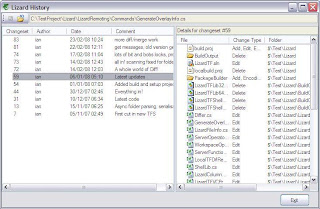 History on the left, full details of check-in on the right. Clink file on right to see history of that, use back button to return, or up-level button for folder history. Right click one or two versions for diff options.
Fed up with the 'Binary Files Differ' response when diffing dlls? Not with LizardTF:
 (test data a little suspect, but trying to diff dlls or exes will give this screen to compare version stamps, etc)
Text diffs are like this:
 (note line differnces shown beneath)
or:
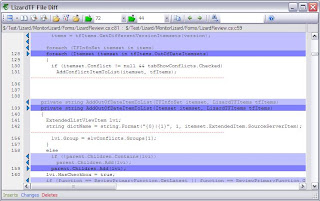 (inline diff, only three context lines).
Note the left and right folder/repo/version browse buttons. once a diff is in view you can reload either side from any file or repository item. If a repository item is loaded you can choose any historic version.
All version picker combo boxes have a 'browse' item, when selected this launches the history browser (shown above) to help you pick the right version.
Also from the explorer context menu:
Blame (anotate) shows originating changeset id/author for all lines in a source file.
Check out/lock, allows locking
Lizard Review, shows all conflicts, out-of-dates, pending changes and other checkouts for selected path
Get specific version - version combo for 'Get' option now works!
Create Workspace option asks if you want to get latest for new workspace and scans/builds Lizard meta data.
Soon I am going to have to write a manual.
Conflict resolution:

One spanking new merge/conflict resolution tool! Colours are a little toned down a bit since the prototype (below), but it took a while to get from prototype to production code, mainly due to the number of scenarios involved. I wanted the merge output window to show exactly what would be written out/saved, so where lines are removed these are shown only in the margins. The lines above and below the 'missing' section right-click to give 'redo above' or 'undo-merge below' options. Some lines can have both above and below options which can be for undo/redo merges or undo resolution.
Hopefully the system should be fairly intuitive to use and should be much better than the MS DiffMerge tool.
Options include:
Two diff views, diff view and merge/conflict view.
Diff view shows differences base:server (theirs) on the left and base:local (yours) on the right. Blank lines are used to keep the files in sync. In merge/conflict view all conflict areas are highlighted and all changes base:server that can/will be merged are shown merged into the right hand base:local view. Clicking between them and looking at the results is proably the best way to get a feel for this.
Context lines
Quite often there are long sections of code with no changes/conflicts, you can choose not to see them by choosing how many context lines around changes/conflicts to show
Three Layouts
Arrange the two diff views and output windows all side-by-side (good for wide screen monitors), diffs together, output beneath (like the MS DiffMerge tool), or my favorite, diffs side-by-side and output in a different window (great for twin monitor set ups)
Also :
Help Text
Don't know what all the colours mean? Hover over any coloured section and help text will explain what the section is showing.
Also new in this release a new history browser:
 History on the left, full details of check-in on the right. Clink file on right to see history of that, use back button to return, or up-level button for folder history. Right click one or two versions for diff options.
Fed up with the 'Binary Files Differ' response when diffing dlls? Not with LizardTF:
 (test data a little suspect, but trying to diff dlls or exes will give this screen to compare version stamps, etc)
Text diffs are like this:
 (note line differnces shown beneath)
or:
 (inline diff, only three context lines).
Note the left and right folder/repo/version browse buttons. once a diff is in view you can reload either side from any file or repository item. If a repository item is loaded you can choose any historic version.
All version picker combo boxes have a 'browse' item, when selected this launches the history browser (shown above) to help you pick the right version.
Also from the explorer context menu:
Blame (anotate) shows originating changeset id/author for all lines in a source file.
Check out/lock, allows locking
Lizard Review, shows all conflicts, out-of-dates, pending changes and other checkouts for selected path
Get specific version - version combo for 'Get' option now works!
Create Workspace option asks if you want to get latest for new workspace and scans/builds Lizard meta data.
Soon I am going to have to write a manual.
Subscribe to:
Posts (Atom)